發表文章

Character bitmap with signal

圖片
#include <stdio.h> #include <signal.h> #include <unistd.h> //how_bitmap函式可將二維陣列的值輸出,輸出方式:當bit為1時輸出’*’,0輸出空白 //字元’ ’,每處理完2個byte輸出換行'\n' void update_time(int sig); char array[2][30] = { { 0x08,0x20,0x08,0x24,0xfe,0xfe,0x08,0x20, 0x00,0x00,0x08,0x20,0x04,0x40,0x04,0x40, 0x02,0x80,0x01,0x00,0x02,0x80,0x0c,0x70, 0x30,0x0e,0xc0,0x04,0x00,0x00 }, { 0x20,0x20,0x51,0xfc,0x88,0x88,0x00,0x50, 0xfb,0xfe,0x22,0x22,0x22,0x22,0xf9,0xfc, 0x21,0x24,0x21,0x24,0xa9,0x24,0x71,0x2c, 0x20,0x20,0xf8,0x20,0x00,0x00 } }; void update_time(int sig) { static int i = 0; static char *ptr = (char*)(void*)array; // change to one dimention char array int j,k; if (i < sizeof(array)) { for (j=0; j<2; j++) { for (k=7; k>=0; k--) { printf("%c", ( *(ptr+i) & (1 << k) ) ? '*' : ' '); ...

Character bitmap

圖片
#include <stdio.h> //how_bitmap函式可將二維陣列的值輸出,輸出方式:當bit為1時輸出’*’,0輸出空白 //字元’ ’,每處理完2個byte輸出換行'\n' void show_bitmap( char (*a)[30] ,int row); char array[2][30] = { { 0x08,0x20,0x08,0x24,0xfe,0xfe,0x08,0x20, 0x00,0x00,0x08,0x20,0x04,0x40,0x04,0x40, 0x02,0x80,0x01,0x00,0x02,0x80,0x0c,0x70, 0x30,0x0e,0xc0,0x04,0x00,0x00 }, { 0x20,0x20,0x51,0xfc,0x88,0x88,0x00,0x50, 0xfb,0xfe,0x22,0x22,0x22,0x22,0xf9,0xfc, 0x21,0x24,0x21,0x24,0xa9,0x24,0x71,0x2c, 0x20,0x20,0xf8,0x20,0x00,0x00 } }; void show_bitmap( char (*a)[30] ,int row) { int i, j, k; for (i=0; i<row; i++) { for (j=0; j<30; j++) { for (k=7; k>=0; k--) { printf("%c", ( a[i][j] & (1 << k) ) ? '*' : ' '); } if ( (j % 2) == 1 ) // new line every two bytes { printf("\n"); ...

qsort without move

圖片
使用 qsort 排序字串陣列,輸出按字典排序方式輸出,但排列完成後,原始陣列內容不可改變 #include <stdio.h> #include <stdlib.h> #include <unistd.h> #include <string.h> #define length (sizeof(string) / sizeof(string[0])) char string[][12] = { "Linux", "programming", "Embedded", "Android", "ittraining" }; static int cmpstringp(const void *p1, const void *p2) { return strcmp(*(char * const *)p1, *(char * const *)p2); } int main() { char* stringindex[length]; int i; // copy pointer for (i=0; i<length; i++) { stringindex[i] = string[i]; } qsort(stringindex, length, sizeof(stringindex[0]), cmpstringp); printf("\nSorted data:\n"); for (i=0; i<length; i++) { printf("%d = %s\n", i, stringindex[i]); } printf("After qsort, origonal array:\n"); for (i=0; i<length; i++) { printf("string[%d] = %s\n", i, string[i]); } ...

Padding file

對任意讀入的檔案進行 padding Padding rule:以 1M, 2M, 4M ... 二的倍數去 padding  顯示補了多少 Bytes 的資料 操作方式:./padding <file> #include <stdio.h> #include <stdlib.h> #include <sys/types.h> #include <sys/stat.h> #include <unistd.h> #include <fcntl.h> #include <string.h> #include <errno.h> int main(int argc, char *argv[]) { int fd; struct stat filestat; off_t alignmentsize; if (argc != 2) { printf("padding <filename>\n"); return 0; } // open file fd = open(argv[1], O_RDWR | O_EXCL); if (fd < 0) { printf("%s\n", strerror(errno)); return 0; } // get filesize fstat(fd, &filestat); if (filestat.st_size >= (1ul << 31) ) { close(fd); perror("File great than 2GB, it can not padding."); return 0; } // check alignment size alignmentsize = 1; while (filestat.st...

Windows 7 開啟 Administrator 帳戶

圖片
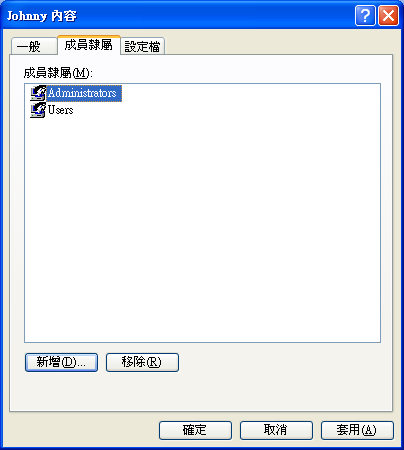
通常使用 Windows 的時候,為了安全性的考量,會將帳戶設定為一般使用者,但必須要有一個系統管理者的條件下才能設定。 以前我不知道有一個 Adminstrator 的帳戶被停用了,直到今天要建的時候才發現 Windows 7 不讓我建,原因是名稱重覆了,才意外發現這個狀況。 於是就照著 一點通 - Windows 7 啟用系統管理員 Administrator 帳戶 (MVP 撰寫) 的說明將帳號啟用了 以系統管理員的身份執行 命令提示宇元 輸入 net user administrator /active:yes 即可 那 Windows XP 呢?它原本就有 Administrator 了,但只要一建立其它使用者,它就隱藏起來,而且新的使用者也無法改成一般使用者。 解決方法也很簡單,直接到 控制台 | 系統管理工具 | 電腦管理 ,打開 本機使用者與群組 | 使用者 ,將該使用者的 成員隸屬 移除 Administrators 群組 就可以了。 參考: XP的使用者帳戶問題~~請大大幫忙

PIC 中斷程式寫法

圖片
程式碼的框架如下 #include < myapp.h > void HISR(); // 高優先權中斷服務常式宣告 void LISR(); // 低優先權中斷服務常式宣告 #pragma config PBADEN = OFF // 將 Port B 類比輸入的功能關閉 // 設定為數位輸入 #pragma code P008 = 0x000008 // 將高優先權中斷服務常式的位置固定在 0x0008 void P008(void) { _asm goto HISR _endasm; // 因空間有限,故跳到實際的中斷服務常式 } #pragma code P018 = 0x000018 // 將低優先權中斷服務常式的位置固定在 0x0018 void P018(void) { _asm goto LISR _endasm; // 跳到實際的中斷服務常式 } #pragma code // 固定程式碼結束標記 #pragma interrupt HISR // 宣告此函式為中斷服務常式,會自動保存暫存器 void HISR() // 並以中斷的方式返回 (重啟 GIE) { CLR(INTCON,BIT1); // 清除中斷旗標 } #pragma interruptlow LISR void LISR() { CLR(INTCON,BIT1); } void main() { SET(INTCON, BIT7 | BIT6 | BIT4); // 初始化 INT0 中斷 while (1) { } }

PIC 中斷觀察

圖片
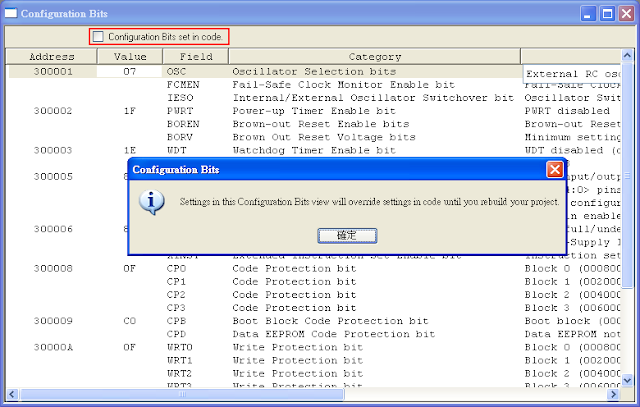
今天來觀察一下中斷的工作方式,先到 Debugger | Select Tool | MPLAB SIM 選擇軟體模擬的方式,然後開啟 View | Program Memory ,照以下的說明輸入組合語言程式來觀察一下吧